Complete Guide AI-Powered Scheduling

CAIRE Scheduling Platform

Unified AI-driven scheduling system combining monthly pre-planning with daily optimization and hybrid human-AI approach. Achieve 50%+ scheduling time savings, 20% travel reduction, and 75–80% staff utilization through intelligent automation and recurring patterns (slingor).

CAIRE AI scheduling platform
50%+
Time Savings in Scheduling Work
20%
Travel Time Reduction
75-80%
Staff Utilization Target
70-80%
First-Time Approval Rate
Key Feature

Automatic Staffing Discovery

Stop guessing how many employees you need. CAIRE automatically discovers the optimal staffing level and shift times based on your visit demand. No placeholders, no manual configuration—just select your visits and click optimize.

Smart Staffing
Optimal Employee Count

System calculates exactly how many employees you need and when they should work—no more guessing or over-staffing.

100% Coverage Goal
Every Visit Assigned

CAIRE's goal is to assign 100% of visits. If more staff is needed, you'll get a clear recommendation with cost analysis.

Learns Over Time
Gets Smarter With Use

As your caregivers use the mobile app, CAIRE learns actual travel patterns and improves accuracy automatically.

Real Example

You have 45 visits on Monday. Instead of guessing "probably need 10 employees?", you select the visits and click optimize. CAIRE discovers: 9 employees needed, creates 14 optimal shifts, assigns all visits with 78% efficiency. Saves you 1 employee + 45 minutes of planning time.

Learn How It Works Pre-Planning Daily Optimization

Key Terms

Slingor (Recurring Patterns)
Swedish for "routes" or "loops". Stable, recurring weekly patterns that provide predictability for both caregivers and care recipients. Slingor form the baseline of your schedule (70-90% of all visits), ensuring continuity while AI optimizes the remaining flexible visits.
Movable Visits
Visits with flexible time windows (e.g., "Monday 07:00 - Sunday 22:00") that can be optimized by AI to find the best placement. Examples include cleaning, walks, and shopping. After customer approval, they become fixed visits.
Fixed Visits (Pinned)
Visits locked to specific times (e.g., "Tuesday 10:00-10:30") that cannot be moved by AI. These come from approved slingor or have narrow time windows (±15-30 minutes).
Pre-Planning
Long-term scheduling (14-30 days ahead) for onboarding new customers from municipal decisions. Optimizes movable visits over weeks/months with flexible time windows before customer approval.
Daily Scheduling
Short-term operations (1-7 days) handling real-time disruptions like sick leave and cancellations. Works within ±15/±30 minute flexibility buffers around the baseline schedule.
Understanding Slingor (Recurring Patterns)

Why slingor matter: Home care is 90% predictable patterns. The same clients need the same services at roughly the same times every week. Fighting this reality with full AI optimization creates chaos and destroys continuity. CAIRE embraces this by letting humans design stable patterns (slingor) while AI optimizes around them.

The Hybrid Philosophy

CAIRE combines the best of both worlds: human expertise in building stable care patterns that maintain continuity, and AI optimization for handling changes and disruptions. The result is a scheduling system that respects relationships while maximizing efficiency.

Human Strengths

Planners excel at building stable recurring patterns that maintain continuity and respect client relationships. They understand the nuances of care delivery.

AI Strengths

AI excels at finding optimal placement for new visits, handling disruptions, and optimizing routes to minimize travel time across hundreds of visits.

The Three Layers

1
Baseline Layer (Slingor) - 90% Pinned, High Stability

Recurring weekly patterns built by planners. These visits are locked and provide continuity. Example: Mrs. Andersson gets help from Lisa every Monday, Wednesday, Friday at 09:00.

2
Smart Growth Layer (Pre-Planning) - Mixed Mode

New clients fit into existing gaps using AI optimization. Movable visits are optimized around the baseline without disrupting slingor.

3
Real-Time Layer - 100% Optimized, Dynamic

Handle disruptions (sick leave, cancellations) with instant AI re-optimization. Ongoing visits stay locked, future visits become flexible.

Why This Works

Home-care routing is a computationally explosive problem combining multiple NP-hard challenges: vehicle routing with time windows (VRPTW), staff scheduling, skill matching, continuity requirements, and multi-objective optimization. A single day with 240 visits and 32 caregivers creates (240!)32 possible route permutations. Neither humans nor algorithms alone can solve this complexity—only a hybrid approach works.

Learn more about the routing science behind CAIRE's hybrid model →

Read the full deep-dive on Slingor

How CAIRE Scheduling Works

CAIRE's scheduling system operates in three coordinated phases, each handling different time horizons and use cases. All phases use the same UI and backend (Bryntum SchedulerPro + Timefold AI solver), but with different time windows and optimization strategies.

Phase 1: Pre-Planning (14-30 Days Ahead)

Purpose: Onboard new customers from municipal decisions. Optimize movable visits (cleaning, walks, shopping) over weeks/months with flexible time windows before customer approval.

How it works: Import movable_visits_anonymized.csv containing both unplanned and planned movable visits. Run optimization with Timefold solver—same process as daily schedules but with broader time windows (e.g., "Monday 07:00 - Sunday 22:00"). AI creates optimized schedule where every movable visit gets a child fixed visit. This becomes the baseline for daily planning.

1
Upload Municipal Decision PDF

AI extracts customer details, service types, frequency, and time preferences from the PDF.

2
Define Time Windows

Set broad windows like "Morning 07:00-10:00" or "Any weekday" for flexible visits.

3
AI Optimizes Over 14-30 Day Window

Solver finds optimal placement considering travel time, staff workload, and existing slingor patterns.

4
Customer Meeting & Approval

Present optimized schedule to customer. Once approved, visits become fixed with ±15 min buffers.

5
Export to Operations System

Publish approved schedule to Carefox/eCare Welfare. Fixed visits become part of recurring slingor.

Read the complete Pre-Planning guide

Phase 2: Daily Scheduling (1-7 Days)

Purpose: Optimize today's visits with nightly automation. Handle sick leave and cancellations in real-time within ±15/±30 minute flexibility buffers.

How it works: Nightly import (02:00 AM, 60-day rolling window) from operations systems. Slingor are expanded into daily baseline with all visits marked as "fixed". AI can only optimize visits with flexibility buffers or newly added movable visits. Real-time updates during the day handle disruptions by temporarily unlocking affected visits.

1
Nightly Import (02:00 AM)

Automatic import from Carefox/eCare Welfare. 60-day rolling window ensures fresh data.

2
AI Optimizes Within ±15/±30 Min Buffers

Solver respects locked visits but can adjust flexible ones within narrow time windows.

3
Results Ready in Morning

Coordinators review optimized schedule, make manual adjustments if needed.

4
Real-Time Updates During Day

Sick leave, cancellations, urgent visits trigger instant re-optimization of affected routes.

5
Compare Planned vs Actual Next Day

Analytics show how well AI predictions matched actual executed visits.

Read the complete Daily Scheduling guide

Phase 3: Real-Time Disruptions

Purpose: Handle unexpected events during the day while protecting ongoing visits and maintaining continuity.

1
Protect Ongoing Visits

Algorithm freezes started/imminent visits. Only future visits become flexible.

2
Run Incremental Optimization

Solver fills gaps and reassigns visits, minimizing disruption to rest of day.

3
Show Diff & Publish

Planner reviews "ghost tracks" (previous positions) and metrics, then publishes to mobile apps.

Key Features
AI Optimization

Powered by Timefold solver. Handles multi-objective optimization: minimize travel, maximize continuity, balance workload, respect time windows.

Import from External Systems

Seamless integration with Carefox, eCare Welfare, and other operations systems. CSV import/export for offline workflows.

Multi-Week Calendar Views

View schedules across 3 days, 1 week, 2 weeks, or 1 month. See demand curves and patterns over time.

Movable vs Fixed Visits

Clear visual distinction. Movable visits (dashed border) can be optimized. Fixed visits (solid border) are locked.

Continuity Engine

Define continuity priority per client. High priority for dementia clients, medium for cleaning. AI respects these preferences.

Skill Matching

Guarantees tasks requiring specific skills (medication, wound care) are only assigned to qualified staff.

Demand Curve Analysis

Visualize demand per hour (daily view) or per day (longer views). Identify bottlenecks before they happen.

Manual vs AI Comparison

Compare manual slinga against CAIRE optimized and actual executed schedules. See the impact in travel time, utilization, and continuity.

Mobile App Publishing

One-click publish to caregiver mobile apps. Real-time notifications for schedule changes.

Unused Hours Recapture

Proactively finds flexible visits to fill gaps from cancellations, maximizing revenue and staff utilization.

Constraint-Based Care

Rules adjustable at Organization, Service Area, Employee, Client, or Visit level. Full flexibility.

Drag & Drop Scheduling

Intuitive drag and drop interface with real-time rule verification. Immediate feedback on continuity, competencies, and time constraints.

For Different Users

For Planners

Your role: Build stable slingor patterns, onboard new customers via pre-planning, define continuity rules and skill requirements.

  • Import 30+ days of history to establish baseline slingor
  • Use Slinga Editor to adjust weekly patterns without altering current published schedules
  • Upload municipal decision PDFs for new customers
  • Review AI-optimized suggestions before customer meetings
  • Define time windows and flexibility levels per visit type

For Coordinators

Your role: Manage daily schedules, handle real-time disruptions, publish to mobile apps, monitor performance.

  • Review nightly optimization results each morning
  • Handle sick leave by running real-time re-optimization
  • Fill gaps from cancellations using AI suggestions
  • Publish approved schedules to caregiver mobile apps
  • Track adherence: planned vs actual executed visits

For Caregivers

Your role: Execute visits according to mobile app schedule, report deviations, receive real-time updates.

  • View your daily route on mobile app with map and timestamps
  • Receive notifications for schedule changes during the day
  • See client details, service instructions, and navigation
  • Report completed visits or issues back to coordinators

For Managers

Your role: Monitor KPIs, analyze performance trends, approve major schedule changes, set organizational rules.

  • View analytics dashboard: utilization, travel time, continuity scores
  • Compare baseline vs AI optimized vs actual executed schedules
  • Track approval rates, time savings, and ROI metrics
  • Set organization-wide constraints and priorities
  • Review disruption patterns to improve future planning

For Customers/Clients

Your role: Review and approve proposed schedules, provide preferences, receive consistent care.

  • Attend meeting with planner to review AI-optimized schedule
  • Express preferences for specific times or caregivers
  • Approve final schedule which becomes fixed pattern
  • Enjoy predictable care with same caregivers at same times (continuity)
Technical Details

Bryntum SchedulerPro Interface

CAIRE uses Bryntum SchedulerPro, a professional-grade scheduling grid component, for the user interface. This provides:

  • Drag & drop event management with real-time validation
  • Multi-week calendar views (3 days, 1 week, 2 weeks, 1 month)
  • Resource timeline showing all employees and their routes
  • Event coloring based on status (fixed, movable, conflicts)
  • Tooltips with visit details, client info, and constraints

Timefold AI Solver

The optimization engine is powered by Timefold (formerly OptaPlanner), a constraint satisfaction solver:

  • Hard constraints: Skill matching, time windows, availability (cannot be broken)
  • Soft constraints: Continuity, travel minimization, workload balance (optimized)
  • Multi-objective: Balances competing goals with weighted scoring
  • Incremental solving: Fast re-optimization when disruptions occur
  • Benchmarks: Continuous testing ensures solution quality

Integration APIs

CAIRE integrates with operations systems via APIs and CSV import/export:

  • Carefox API: Two-way sync for visits, clients, employees, schedules
  • eCare Welfare API: Similar integration for Welfare users
  • CSV Import: Offline workflow for pilots or non-API systems
  • CSV Export: Publish optimized schedules back to operations systems
  • Webhook Support: Real-time notifications for schedule changes

Data Model

Core entities in CAIRE's scheduling system:

  • Organization: Top-level entity with settings and constraints
  • ServiceArea: Geographic region with specific rules
  • Employee: Caregiver with skills, availability, home location
  • Client: Care recipient with needs, preferences, location
  • Visit: Scheduled service with time window, duration, required skills
  • Slinga: Recurring weekly pattern (template) that generates daily visits
  • Schedule: Collection of visits for a specific date range
  • Solution: Optimized assignment of visits to employees with routes

System Architecture

CAIRE follows a microservices architecture:

  • Dashboard (React + Vite): Frontend UI for planners and coordinators
  • Dashboard-Server (GraphQL): Backend API with Prisma ORM and PostgreSQL
  • Timefold Solver Service: Java-based optimization engine
  • Integration Layer: Handles external API calls and CSV processing
  • Mobile Apps: React Native apps for caregivers (iOS/Android)

Product Screenshots

Preview how pre-planning suggestions, daily AI-optimized schedules, and route details interact in the platform. All personal data is masked but workflows are shown exactly as in production.

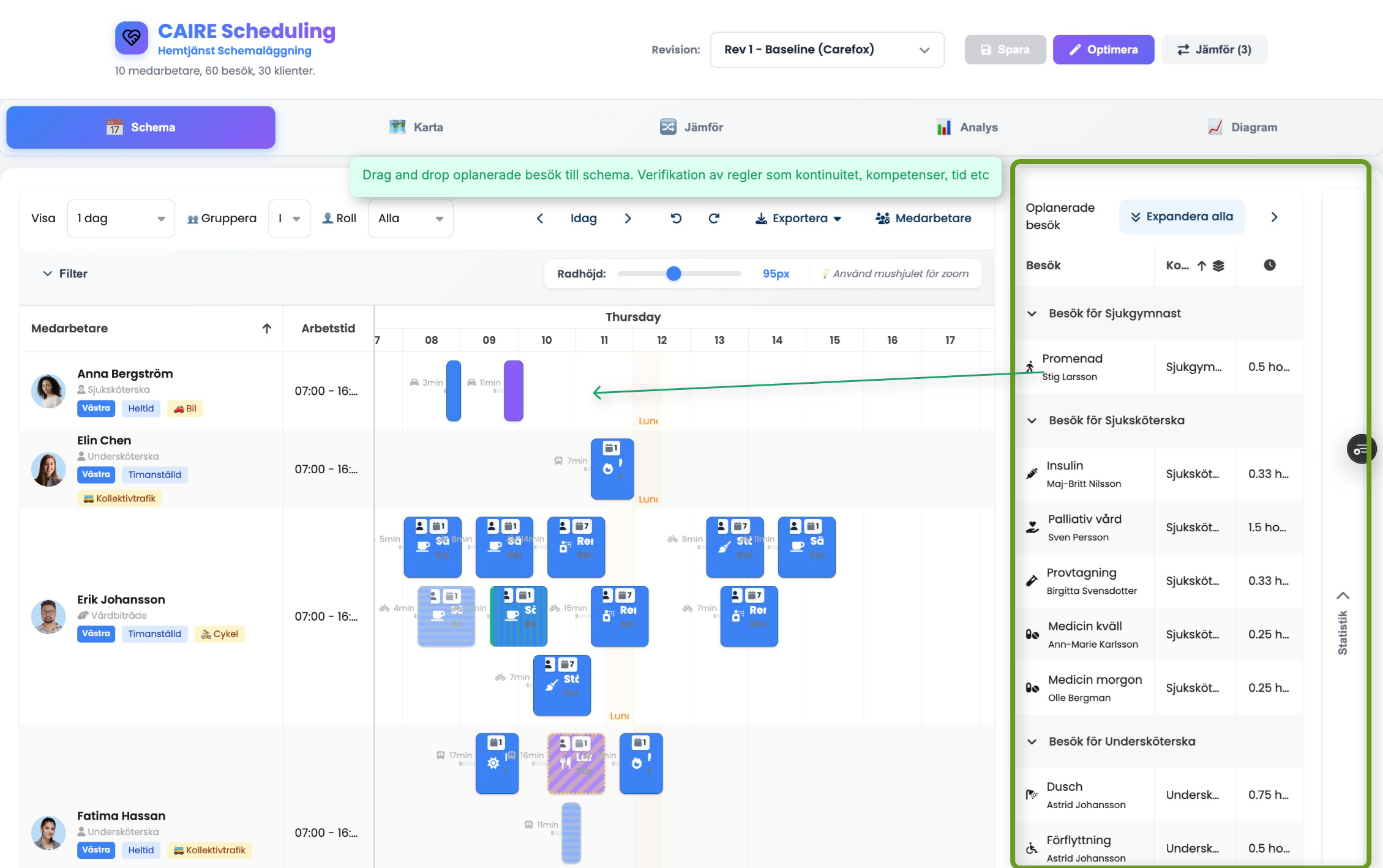
Drag & Drop

Drag & Drop Scheduling

Drag and drop interface for scheduling visits with real-time rule verification
Intuitive drag and drop interface for scheduling visits with real-time rule verification. Drag unplanned visits to the schedule and see immediate validation of continuity, competencies, and time constraints.
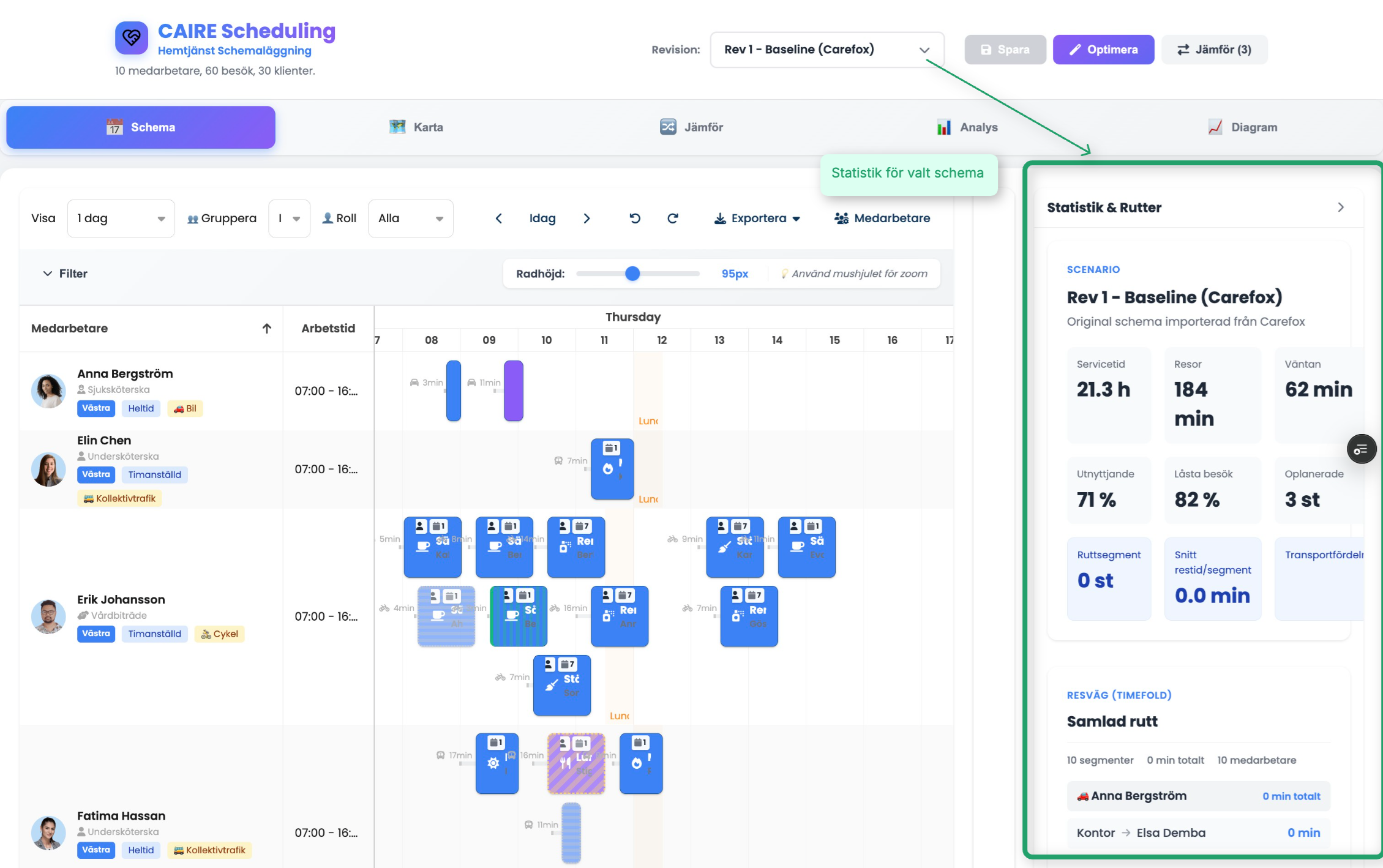
Statistics

Statistics & Routes

Comprehensive statistics and route optimization insights for schedule performance
Comprehensive statistics and route optimization insights for schedule performance. View service time, travel time, waiting time, utilization rates, and route segments for each employee.
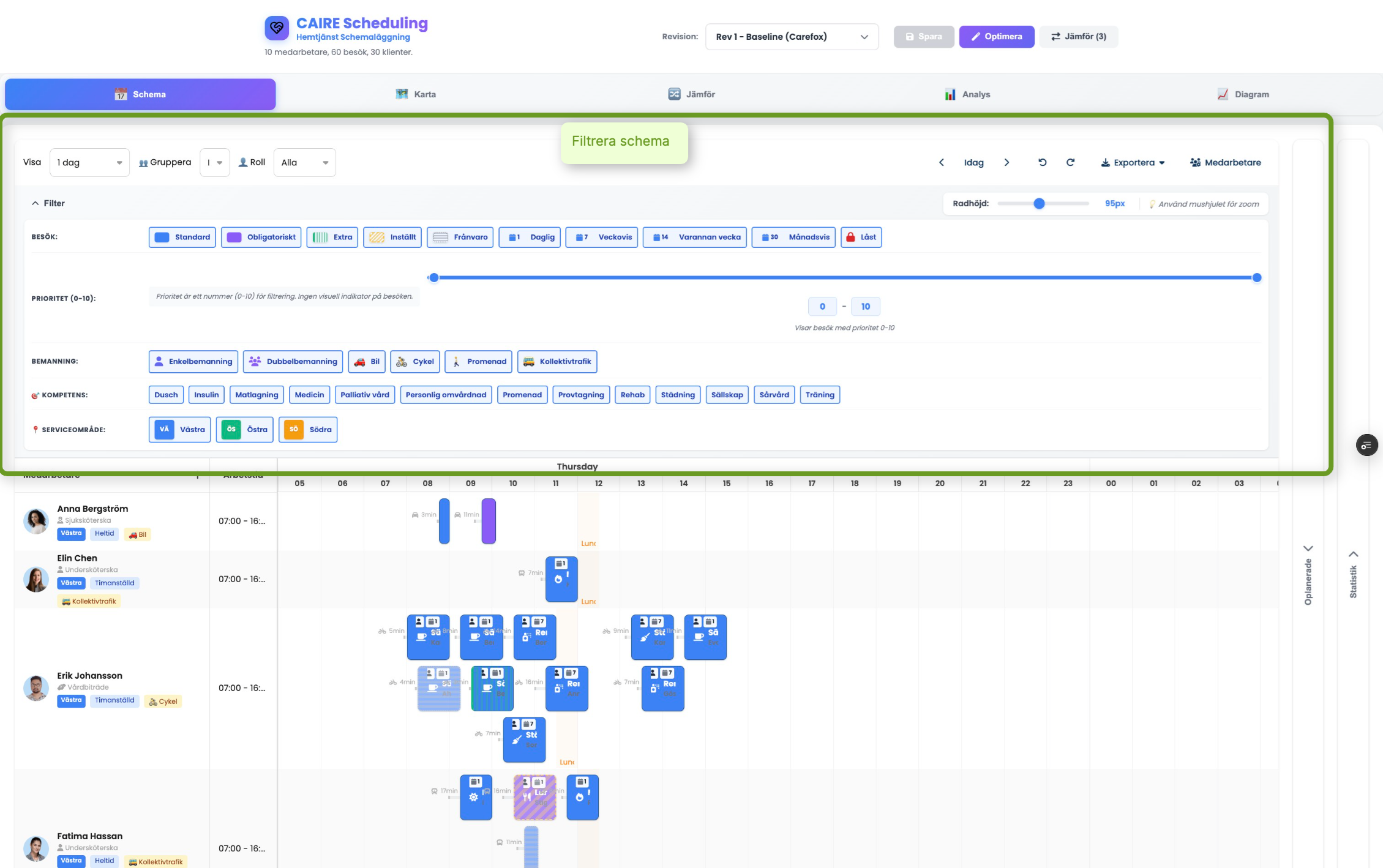
Filtering

Advanced Filtering

Powerful filtering options for visits, staff, competencies, and service areas
Powerful filtering options for visits, staff, competencies, and service areas. Filter by visit type, priority, staffing requirements, competencies, and service areas to focus on specific scheduling needs.
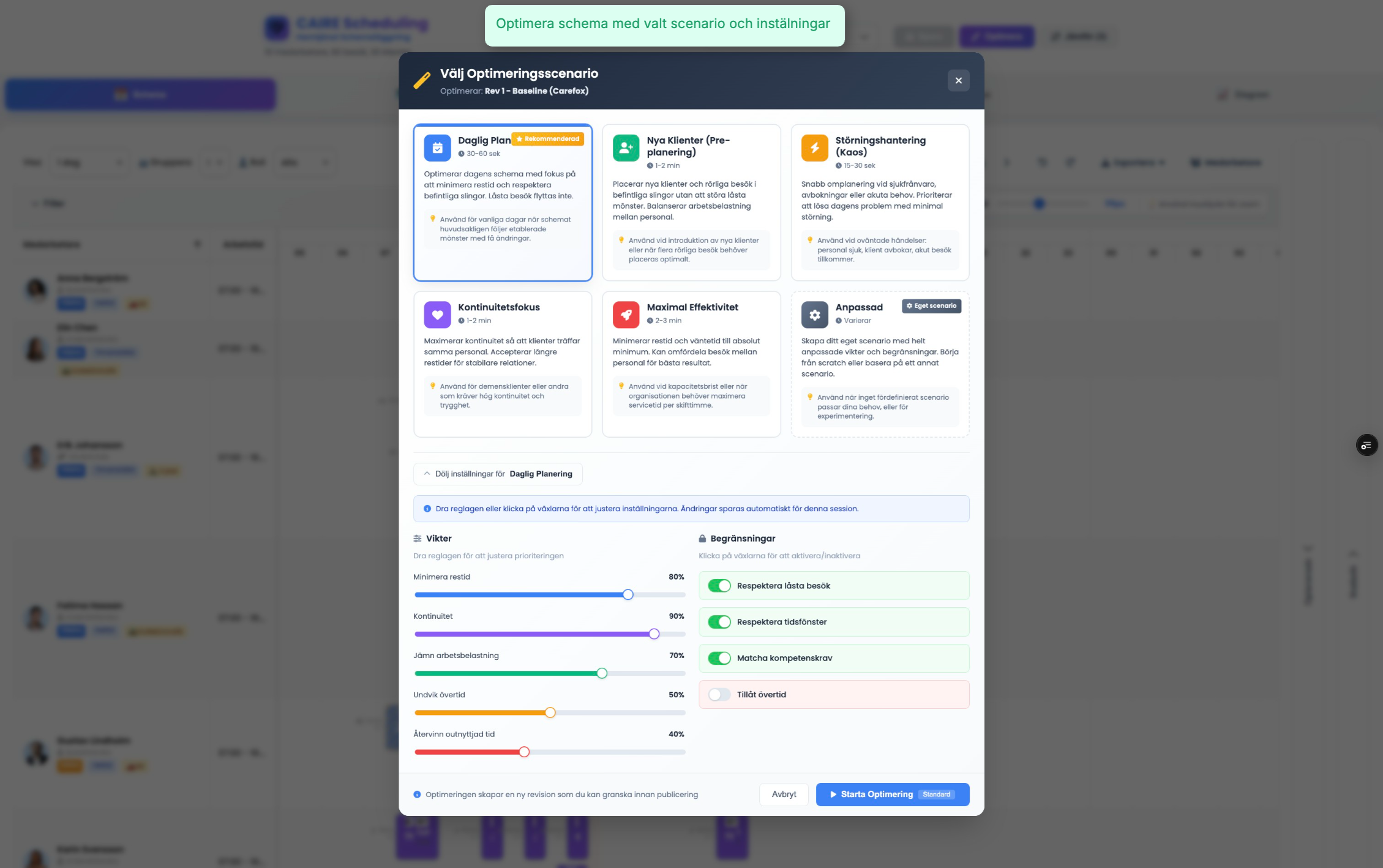
Optimization

Optimization Scenarios

Choose from predefined optimization scenarios or create custom optimization settings
Choose from predefined optimization scenarios or create custom optimization settings. Select scenarios like Daily Plan, New Clients, Disruption Management, Continuity Focus, or Maximum Efficiency, each with customizable weights and constraints.
Pre-Planning

Approve recurring visits with one click

Pre-planning approval modal with anonymized client data
AI identifies patterns that require user approval before optimization becomes a fixed plan. The panel shows priority, time suggestions, and why the change is recommended.
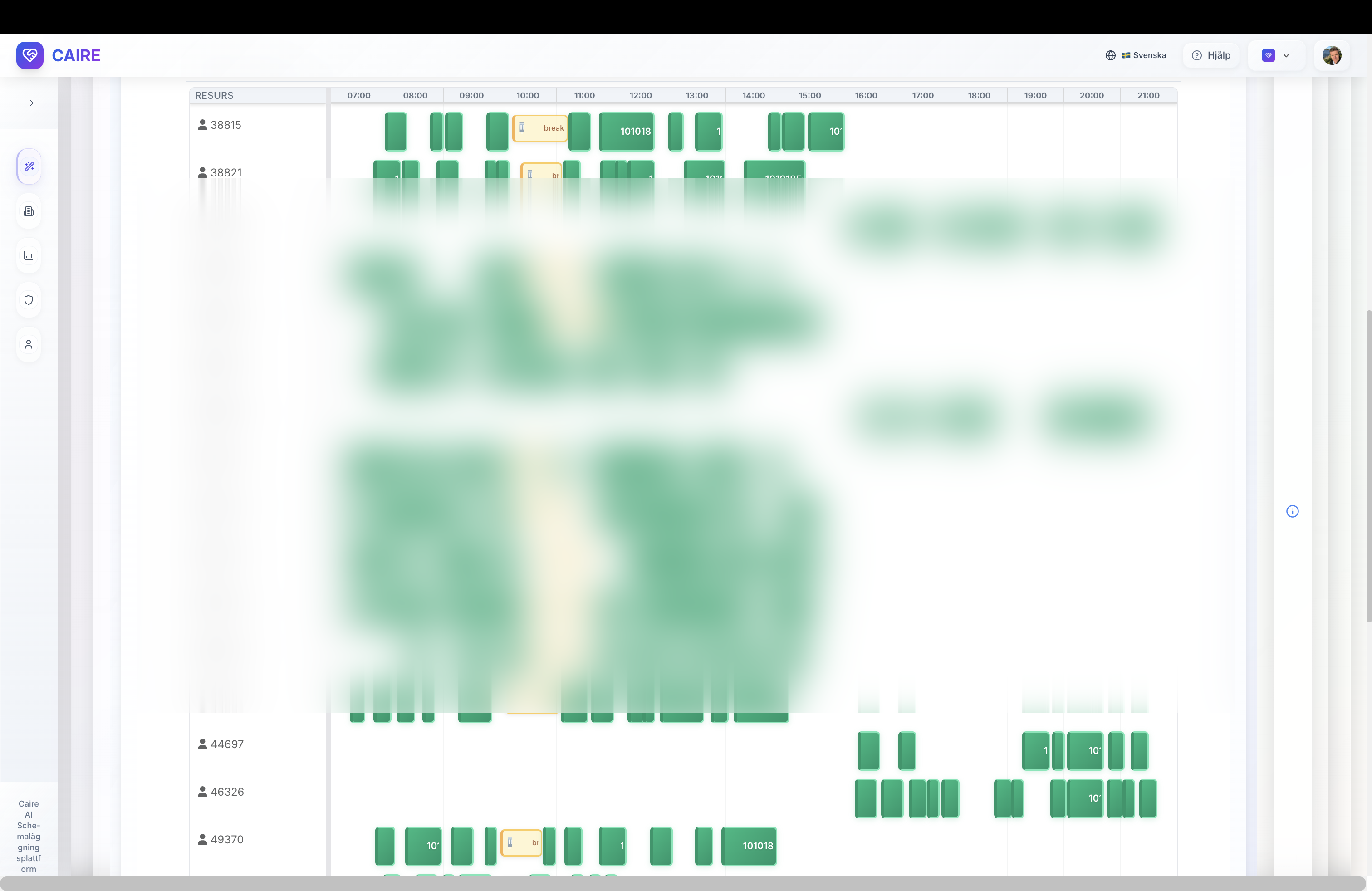
Daily Review

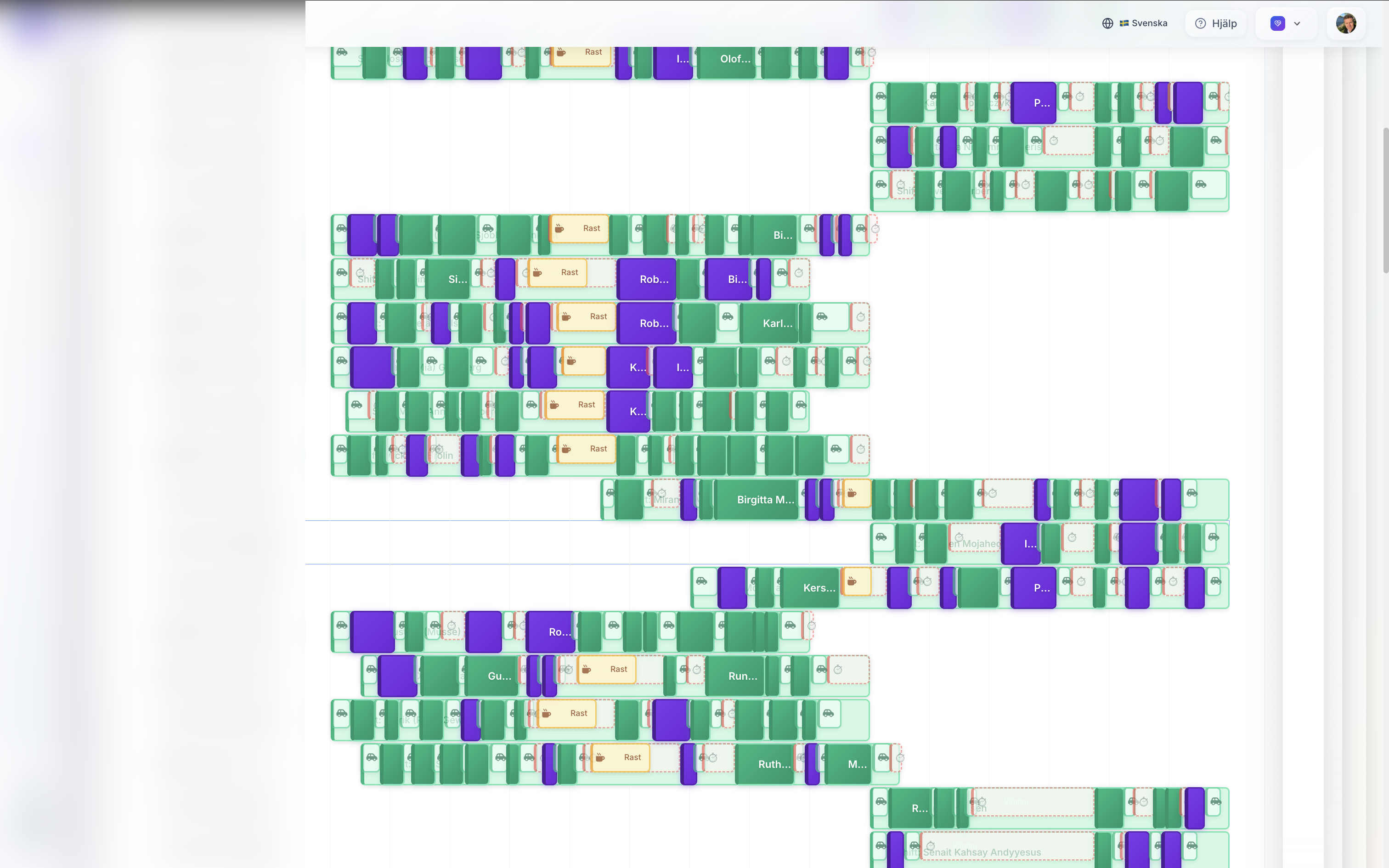
Optimized daily schedule ready for publishing

AI-optimized schedule timeline with anonymized caregiver list
The timeline shows all employees' shifts, service, travel, and breaks in one view. Color coding makes it easy to see balance and identify gaps.
Routes

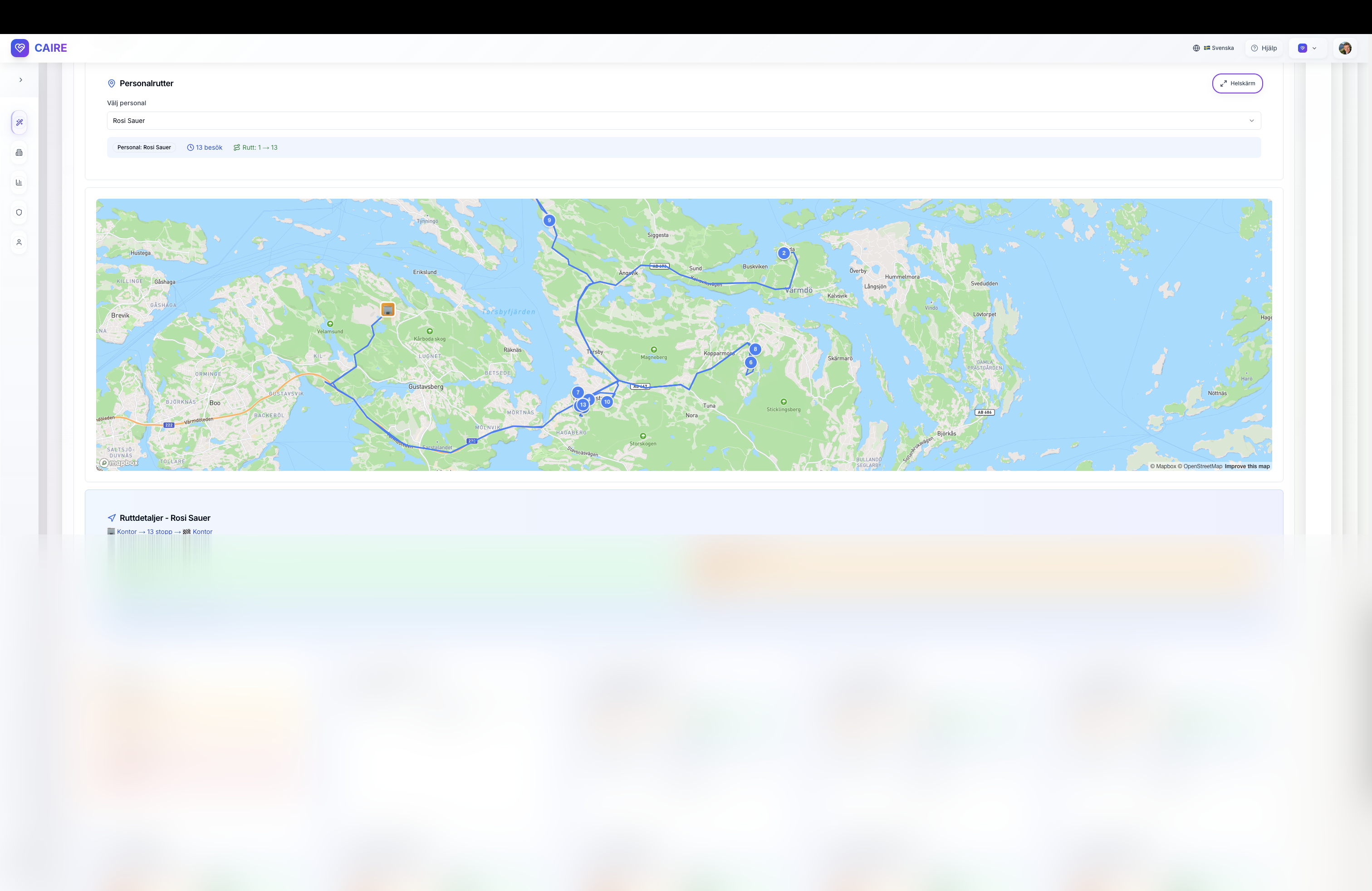
Map view for route validation

Route map with anonymized client cards highlighting travel insights
The map layout visualizes each caregiver's route, timestamps, and alternatives. Compare office start against optimal route and see quality indicators in real-time.
Frequently Asked Questions

What's the difference between pre-planning and daily scheduling?

Pre-planning handles long-term scheduling (14-30 days ahead) for onboarding new customers. It uses broad time windows (e.g., "Monday 07:00 - Sunday 22:00") and requires customer approval before visits become fixed. Daily scheduling handles short-term operations (1-7 days) with narrow time windows (±15-30 min) for real-time disruptions. Both use the same UI and backend.

Can I use CAIRE without Carefox or eCare Welfare?

Yes! While CAIRE has API integrations with Carefox and eCare Welfare for two-way sync, you can also use CSV import/export for offline workflows. This is common during pilot phases or for organizations using other systems.

How does AI handle continuity?

You define continuity priority per client (high, medium, low). High priority clients (e.g., dementia) will preferentially get the same caregiver every time. Medium priority (e.g., cleaning) allows more flexibility. AI respects these weights when optimizing.

What happens if AI suggests bad assignments?

All AI suggestions are reviewed by humans before publishing. You can manually override any assignment using drag & drop. The system validates rules in real-time (skills, time windows, availability).

How long does optimization take?

Depends on problem size. Daily schedules (50-300 visits) typically optimize in 1-5 minutes. Pre-planning (longer time spans) may take 10-30 minutes. You can set time limits and stop early if needed.

Can I lock specific visits so AI never touches them?

Yes! Use the pin/unpin feature. Pinned visits are locked and won't be moved by AI. This is useful for VIP clients or sensitive situations.

What if a caregiver calls in sick?

Mark the employee as unavailable. CAIRE will protect ongoing visits (already started or imminent) and re-optimize future visits to other available caregivers. You'll see a diff view showing what changed.

Does CAIRE work for small organizations?

Yes! CAIRE scales from 5-10 employees to 100+. Smaller organizations benefit even more from time savings since manual scheduling is proportionally more time-consuming.

Continue exploring the CAIRE platform

Dive deeper into resource management and analytics to complete your understanding.

Resource management Analytics & KPIs Routing Science